Real-time transcription over a WebSocket, in TypeScript
How microphone audio becomes live text over one WebSocket in Node: voice detection in the browser, 16 kHz PCM chunks, five messages and a streaming STT.
October 6, 2026
Godefroy de CompreignacUpdated on October 21, 2026
Key takeaways
- Live transcription works on a stream with no end yet, so the system has to mark where each sentence ends before a model can return its final text.
- With voice detection in the browser, only speech travels over the WebSocket, so a provider billed per minute of audio charges only for the moments someone talks.
- The silence a voice detector waits for at the end of a sentence usually adds more delay to live transcription than the transcription model itself.
- Whisper reads thirty seconds of audio at a time. To stream it, you either re-run it on a growing buffer or transcribe each sentence once it ends.
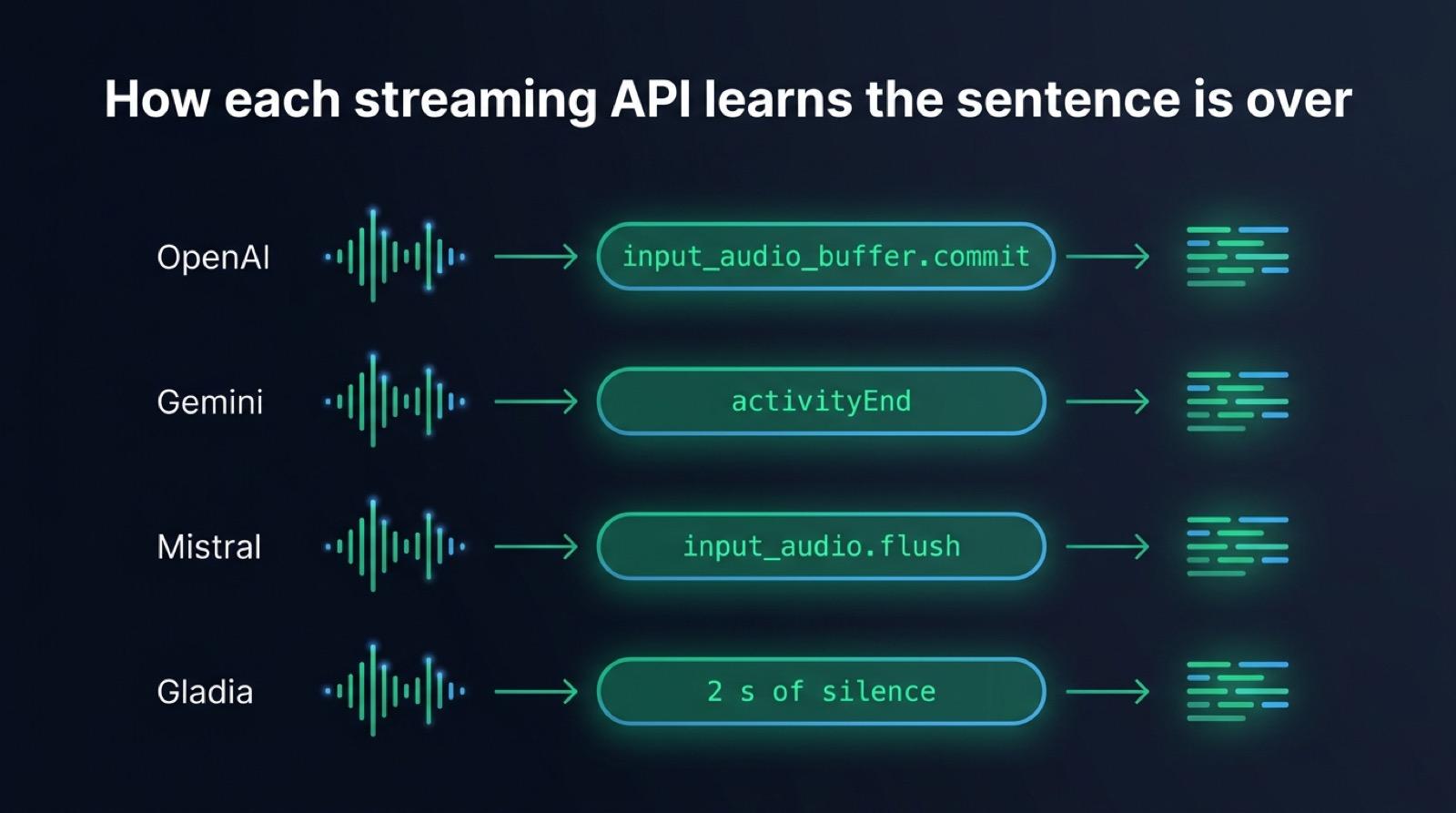
- Every streaming speech to text API needs an explicit signal that a sentence is over, under a different name at each provider.
Real-time transcription in TypeScript works by streaming small chunks of microphone audio over a WebSocket to a Node server, which forwards them to a streaming speech to text model and sends the text back as soon as each sentence ends. The browser runs voice detection, so only speech travels. The server then tells the model the sentence is complete and gets the final text back a few hundred milliseconds later. This article follows that path from the microphone to the transcript, shows the five messages that carry it, explains why Whisper needs extra work to stream, and lists what breaks once real users connect.
Real-time transcription works on audio with no end yet
A transcription API you call with a file receives a beginning, a middle and an end. It can read the whole recording, look ahead, correct itself, and return the text when it is done.
A live call has no file. The audio is still being spoken when the first chunk leaves the browser, and nobody knows yet how long the sentence will last. So the system has to answer three questions that a file answers by itself: when a sentence starts, what to send while it lasts, and when it is over.
The usual mistake is to record a few seconds, upload them, and call that streaming. The cut often falls in the middle of a word, the model sees half a sentence, and the user waits for the next batch to see the end of it.
The path of the audio, from the microphone to the transcript
The browser captures the microphone, resamples the audio to 16 kHz mono PCM, and runs voice activity detection on it. When the detector hears speech, the page sends StartSpeaking, then a binary chunk every 100 ms. When the detector hears enough silence, the page sends StopSpeaking. The server opens a stream to the speech to text provider on the first message, writes each chunk into it, closes it on the last one, and sends the final transcript back over the same socket.
graph TD
    A[Microphone in the browser] --> B[Resampled to 16 kHz mono PCM]
    B --> C{Voice activity detection<br>hears speech?}
    C -->|No| B
    C -->|Yes| D[StartSpeaking over the WebSocket]
    D --> E[Binary PCM chunks, one every 100 ms]
    E --> F[Node server writes them<br>into a stream to the STT provider]
    F --> G[Silence: StopSpeaking]
    G --> H[Server tells the provider<br>the sentence is over]
    H --> I[Final transcript]
    I --> J[Message sent back<br>over the same WebSocket]
Most speech models were trained on 16 kHz audio. At 16 bit per sample, that rate weighs 32 KB per second, so one 100 ms chunk is 3.2 KB. A WebSocket carries that easily, even on a mobile connection. The server resamples the audio for a provider that expects another rate, such as OpenAI’s Realtime API at 24 kHz.
The browser’s voice detector sets the latency you feel
The voice activity detector decides when a sentence opens and when it closes. When it runs in the browser, silence stays on the page. The provider receives only the moments when someone talks, which keeps the bandwidth down, and the bill too when the model is billed per minute of audio.
The detector also ends the sentence before the audio reaches the server. It cannot know a sentence is finished, so it waits for a stretch of silence. A turn opens about 280 ms after the first word and closes about 760 ms after the last one, on our measurements with the default settings of Micdrop, an open source TypeScript library for real-time voice conversations. You can tune both numbers with the detector settings, since each setting adds a known delay to the turn.
Those 760 ms of silence usually take longer than the transcription itself. A streaming model that already holds the whole sentence needs a few hundred milliseconds to return its final text once told the sentence is over. Shortening the silence speeds up the transcript more than switching models does, but it also cuts people off when they hesitate. A turn detector lets the silence stay short: this small model listens to the end of the sentence and keeps the turn open when it sounds unfinished.
The detector also clips the start of a sentence. It needs a few windows of audio to be sure it heard a voice, by which time the first syllable is already gone. Micdrop keeps the most recent audio in reserve and sends it with the first chunks, so the transcript starts on the first word. Read how Silero, WebRTC VAD and a volume threshold compare in the browser to pick a detector.
Five messages carry the whole protocol
The page sends two text commands and binary audio. The server sends text messages back.
| Direction | Message | Meaning |
|---|---|---|
| Browser to server | StartSpeaking | A sentence begins, open a stream to the provider |
| Browser to server | Binary frame | 100 ms of 16 bit PCM at 16 kHz |
| Browser to server | StopSpeaking | The sentence is over, ask for the final text |
| Server to browser | Message with JSON | The final transcript of one sentence |
| Server to browser | SkipAnswer | Nothing to wait for, listen again |
The WebSocket itself tells text frames from binary frames, so commands and audio share one connection with no header or envelope. Calls with an agent and a voice add a few more messages to the protocol, which a transcription server can skip.
Micdrop implements both ends. MicdropServer works as a dictation server when you give it a speech to text provider and nothing else:
import { MicdropServer } from '@micdrop/server'import { GeminiSTT } from '@micdrop/gemini'import { WebSocketServer } from 'ws'
const wss = new WebSocketServer({ port: 8088 })
wss.on('connection', (socket) => {  new MicdropServer(socket, {    stt: new GeminiSTT({ apiKey: process.env.GEMINI_API_KEY || '' }),  })})
In the page, @micdrop/web asks for the microphone, runs the detector, resamples the audio, cuts it into chunks and sends them:
import { Micdrop } from '@micdrop/web'import '@micdrop/web/silero'
await Micdrop.start({ url: 'ws://localhost:8088', vad: ['volume', 'silero'] })
Micdrop.on('Message', (message) => {  if (message.role !== 'user') return  textarea.value += (textarea.value ? ' ' : '') + message.content})
With a microphone button and a language picker around them, these two files make a complete dictation app. Both sides are TypeScript, so the page and the server import the same message types, whereas a Python backend and a JavaScript page each keep their own copy.
Streaming Whisper from Node
Whisper was trained on thirty second windows, so its encoder always reads thirty seconds of audio. A two second sentence gets padded with silence before the encoder runs. Whisper was built for recordings. OpenAI’s whisper-1 API, for instance, accepts files only.
The best known streaming projects are written in Python and work around the window in two ways:
- whisper_streaming, from the Institute of Formal and Applied Linguistics at Charles University in Prague, re-runs Whisper on a growing buffer and confirms the words that two consecutive runs agree on. Its authors report 3.3 seconds of latency on long unsegmented speech and now point to its successor, SimulStreaming.
- WhisperLive, from Collabora, runs a WebSocket server in front of faster-whisper, TensorRT or OpenVINO and sends segments back as they are transcribed.
Both re-transcribe the same audio several times to show words while the user speaks. That suits captions, where a person reads along. A dictation box or a voice agent mostly needs the final sentence, and needs it fast.
Cut the audio into sentences in the browser, and Whisper gets the kind of input it was built for, one short recording at a time. Each utterance arrives as one stream, the server waits for its end, and Whisper reads it once. @micdrop/whisper runs Whisper in the Node process through Transformers.js and ONNX Runtime, with no Python and no API key:
import { MicdropServer } from '@micdrop/server'import { WhisperSTT } from '@micdrop/whisper'
new MicdropServer(socket, {  stt: new WhisperSTT({ model: 'base', language: 'en' }),})
base returns a three second sentence in about 440 ms and tiny in about 320 ms, on the CPU of a MacBook Pro M2. The encoder spends most of that time on the thirty second window, so a short sentence costs nearly as much as a long one. Moonshine and Parakeet read audio at its real length. See how they compare with Whisper and its faster runtimes for local speech to text in Node.
What each streaming API sends back over its WebSocket
Hosted streaming models transcribe while the audio arrives, so the final text is nearly ready when the sentence ends. Each one still needs a signal that the sentence is over, under a different name at each provider. Micdrop turns off the provider’s own speech detection wherever it can, since the browser already decided where the sentence ends.
| Provider | Audio sent as | End of sentence signal | What comes back |
|---|---|---|---|
OpenAI, gpt-4o-transcribe, gpt-4o-mini-transcribe, gpt-live-transcribe | Base64 PCM at 24 kHz in JSON | input_audio_buffer.commit, with server detection off | Deltas while speaking, then conversation.item.input_audio_transcription.completed |
Gemini, gemini-3.5-transcribe-live | Base64 PCM at 16 kHz in JSON | activityEnd, with automatic detection off | Pieces of inputTranscription as the user speaks |
Mistral, voxtral-mini-transcribe-realtime-3-0 | Base64 PCM at 16 kHz in JSON | input_audio.flush, which keeps the session open | transcription.text.delta, then transcription.done |
| Gladia | Raw binary PCM at 16 kHz | Two seconds of silence | transcript messages, the last one marked is_final |
Mistral also accepts input_audio.end, which closes the whole session, so the next sentence would have to open a new connection. A flush ends the sentence and keeps the connection for the next one. Gladia has no end of sentence message, so the integration sends silence to make it close the sentence.
These models also differ on price per minute, languages and accuracy. Ten hosted APIs, Deepgram and AssemblyAI among them, are ranked on time to the final transcript and error rate. Any other provider fits behind the same interface: a custom speech to text class has a single transcribe() method that receives one stream per sentence and emits a Transcript event.
What breaks in production
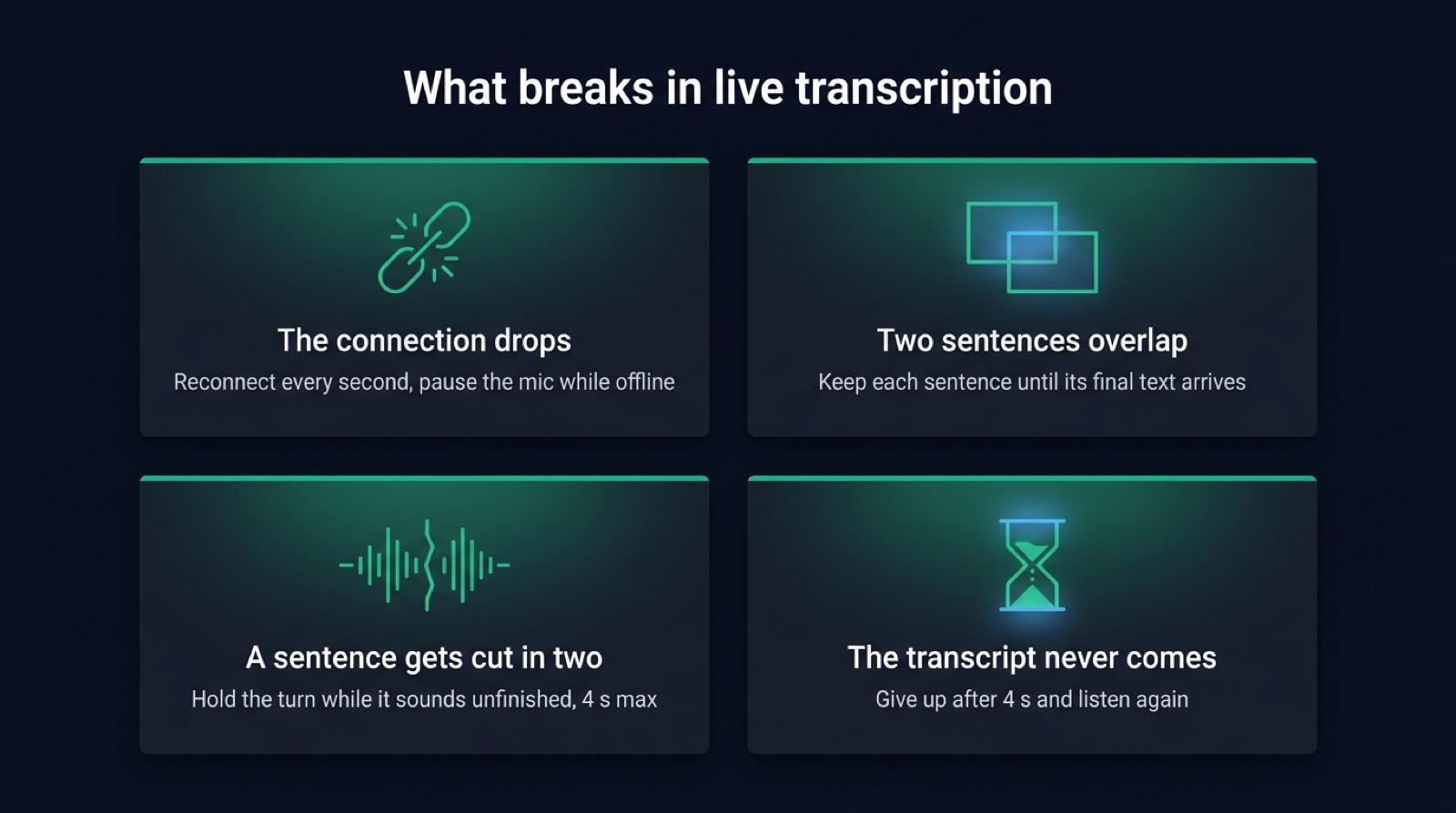
A demo runs on one laptop with a good connection. Once real users connect from real networks, four things go wrong.
The connection drops
A train enters a tunnel, the laptop changes networks, a proxy closes idle connections. The page has to reconnect on its own and pause recording while it is offline. Micdrop’s client reconnects every second by default, with a five second timeout per attempt, and pauses the voice detector while it is offline. The transcript already on the page stays there. The server closes the provider connection along with the socket and starts a fresh call on the new one. For a call with an agent, resume the conversation by replaying the saved messages into it.
Provider connections drop too. Each integration reconnects to its provider. Gemini Live also caps a session at ten minutes, so the Gemini integration opens the next session between two sentences. When every retry to a provider fails, FallbackSTT sends the audio of the sentence in progress to the next provider.
Two sentences overlap
WebSocket runs over TCP, so the chunks arrive in order. On the server, though, the final text of one sentence can still be on its way when the next sentence starts. If the integration resets its buffer as soon as a new stream opens, the late transcript is attached to the wrong sentence or lost. The Mistral integration clears its text only once the next sentence carries audio, since the detector opens many streams on noise that hold no speech. The Gemini integration closes a sentence still waiting for its text before it opens the next one.
A sentence gets cut in two
A user pauses to find a word, the detector hears silence, and the sentence arrives in two pieces. In dictation that only adds a space. In a voice agent it means an answer to half a question. A turn detector keeps the turn open when the sentence sounds unfinished, for four seconds at most by default. A provider can also split a sentence on its own. Gladia closes a sentence after 50 ms of silence by default, which split our French test sentence at the comma until we raised endpointing to half a second.
The final transcript never comes
A provider hangs, or the stream carried only a cough. Without a deadline the page waits forever with a spinner. Every Micdrop integration gives the provider four seconds after the end of the sentence, then emits what it has, possibly an empty string. The server answers an empty transcript with SkipAnswer, which sends the page back to listening.
Frequently asked questions
Can Whisper do live transcription?
Yes, with a layer of code around it. Whisper reads a recording in thirty second windows. OpenAI’s whisper-1 API accepts files only. Projects like whisper_streaming re-run it on a growing buffer to show words as they are spoken, at around 3.3 seconds of latency. For dictation or a voice agent, cut the audio into sentences with voice activity detection and transcribe each one when it ends. Whisper then returns the text a few hundred milliseconds after the sentence closes. For words shown while the user is still speaking, use a streaming model such as gpt-4o-transcribe or Gemini Transcribe.
Should I use WebSocket or WebRTC for real-time transcription?
WebSocket is enough when the audio goes from a browser to your own server. It carries text and binary frames on one connection, works through most proxies, and needs no media server. With voice detection in the browser, only speech travels, so the bandwidth stays low. WebRTC fits peer to peer calls and lossy networks, at the cost of a signalling server and more setup.
What audio format should I stream to a speech to text API?
Raw 16 bit PCM, mono, at 16 kHz suits most streaming models and weighs 32 KB per second. Send it in chunks of 20 to 100 ms. OpenAI’s Realtime API expects 24 kHz, so keep the browser at 16 kHz and resample on the server for that provider.
Can I transcribe audio in Node.js without Python?
Yes. Hosted models stream over a WebSocket from Node. Whisper itself runs in the Node process through Transformers.js and ONNX Runtime, with the @micdrop/whisper package. whisper.cpp also has Node bindings.
Getting started
A live transcription server comes down to a voice detector in the page, one WebSocket, five messages and a streaming model told when each sentence ends. Micdrop ships the browser client, the Node server and the provider integrations in TypeScript, so you can run the server in Node with a single speech to text option, then add an agent and a voice to the same call when you need it to answer.


