A voice assistant on OpenAI Realtime
One speech to speech model hears and answers, and Micdrop still handles the turns, the interruptions and the transcript.
See the codeMicdrop streams your users’ speech to your Node server and plays the answer from the AI models you choose. One voice call runs in a web app, an iOS app or an Android app against the same server.
import { Micdrop } from '@micdrop/web'import { useMicdropState } from '@micdrop/react'
const start = () => Micdrop.start({ url: 'wss://your-server.com' })
function Call() { const { isStarted, conversation } = useMicdropState() return ( <> <button onClick={isStarted ? Micdrop.stop : start}> {isStarted ? 'Hang up' : 'Start the call'} </button> {conversation.map((item, i) => 'content' in item && ( <p key={i}>{item.role}: {item.content}</p> ) )} </> )}import { Micdrop } from '@micdrop/react-native'import { useMicdropState } from '@micdrop/react'import { Button, Text, View } from 'react-native'
const start = () => Micdrop.start({ url: 'wss://your-server.com' })
function Call() { const { isStarted, conversation } = useMicdropState() return ( <View> <Button title={isStarted ? 'Hang up' : 'Start the call'} onPress={isStarted ? Micdrop.stop : start} /> {conversation.map((item, i) => 'content' in item && ( <Text key={i}>{item.role}: {item.content}</Text> ) )} </View> )}import { Micdrop } from '@micdrop/web'
Micdrop.start({ url: 'wss://your-server.com' })
Micdrop.on('StateChange', (state) => { console.log(state.conversation) console.log(state.isAssistantSpeaking)})
Micdrop.on('EndCall', () => { console.log('Call ended by assistant')})
// Hang upMicdrop.stop()import { MicdropServer } from '@micdrop/server'import { OpenaiAgent } from '@micdrop/openai'import { GladiaSTT } from '@micdrop/gladia'import { ElevenLabsTTS } from '@micdrop/elevenlabs'
const { OPENAI_KEY, GLADIA_KEY, TTS_KEY, VOICE } = process.env as Record<string, string>const systemPrompt = 'You are a helpful assistant'
wss.on('connection', (socket) => { new MicdropServer(socket, { firstMessage: 'How can I help you today?', agent: new OpenaiAgent({ apiKey: OPENAI_KEY, systemPrompt }), stt: new GladiaSTT({ apiKey: GLADIA_KEY }), tts: new ElevenLabsTTS({ apiKey: TTS_KEY, voiceId: VOICE }), })})Every demo is open source in the repository, ready to run with your own API keys.
One speech to speech model hears and answers, and Micdrop still handles the turns, the interruptions and the transcript.
See the codeThe call speaks French, on French providers from the transcription to the voice.
See the codeTranscription, agent and voice run locally, with no API key, and the audio stays on the laptop.
See the codeTwo robots hear the same sentence. One reads it with Jev, the other with Claude, and a clock under each shows which one moves first.
See the codeAsk yes or no questions out loud to find who the game is playing. It answers in the first person, and Jev reads each question in a few hundred milliseconds.
See the codeThe game thinks of something and answers each question with yes, probably, I don’t know, probably not or no.
See the codeA voice agent feels slow or rude when it cuts you off mid-thought, waits too long to answer, or talks over you.
Voice activity detection runs in the browser, which streams the audio to your server while you are still talking.
Turn detection sees that the sentence is unfinished, so the agent waits for you to say the day.
Before it answers, the agent calls a tool you wrote, which runs in your Node server next to your database.
Text to speech reads the first words of the answer while the model is still writing the rest.
Playback stops as soon as you talk. Echo cancellation keeps the assistant’s voice out of your microphone.
import { MicdropServer } from '@micdrop/server'import { GladiaSTT } from '@micdrop/gladia'import { OpenaiAgent } from '@micdrop/openai'import { ElevenLabsTTS } from '@micdrop/elevenlabs'
new MicdropServer(socket, {  stt: new GladiaSTT({ apiKey: GLADIA_KEY }),  agent: new OpenaiAgent({ apiKey: OPENAI_KEY, systemPrompt }),  tts: new ElevenLabsTTS({ apiKey: ELEVENLABS_KEY, voiceId }),})
Each stage streams into the next. To swap a provider, you change its line. Read the docs →
import { MicdropServer } from '@micdrop/server'import { GeminiLive } from '@micdrop/gemini'
new MicdropServer(socket, {  realtime: new GeminiLive({    apiKey: GEMINI_KEY,    systemPrompt,  }),})
One model hears the audio and answers in audio. Micdrop still handles the turns, the interruptions and the order of the transcript. Read the docs →
import { MicdropServer } from '@micdrop/server'import { GladiaSTT } from '@micdrop/gladia'import { MistralAgent } from '@micdrop/mistral'import { GradiumTTS } from '@micdrop/gradium'
new MicdropServer(socket, {  stt: new GladiaSTT({ apiKey: GLADIA_KEY }),  agent: new MistralAgent({ apiKey: MISTRAL_KEY, systemPrompt }),  tts: new GradiumTTS({ apiKey: GRADIUM_KEY, voiceId, region: 'eu' }),})
Three European providers keep the audio and the conversation inside the EU. They handle French and 90 other languages. Read the docs →
import { MicdropServer } from '@micdrop/server'import { MistralSTT, MistralAgent, MistralTTS } from '@micdrop/mistral'
new MicdropServer(socket, {  stt: new MistralSTT({ apiKey: MISTRAL_KEY }),  agent: new MistralAgent({ apiKey: MISTRAL_KEY, systemPrompt }),  tts: new MistralTTS({ apiKey: MISTRAL_KEY, voiceId: 'voice_592' }),})
Mistral transcribes, answers and speaks, so the whole call runs on one account and one bill. Voxtral Speech 3 reads more than 35 languages and clones a voice from a few seconds of audio. Read the docs →
import { MicdropServer } from '@micdrop/server'import { WhisperSTT } from '@micdrop/whisper'import { AiSdkAgent } from '@micdrop/ai-sdk'import { KokoroTTS } from '@micdrop/kokoro'import { createOpenAI } from '@ai-sdk/openai'
// Ollama serves the OpenAI protocol on /v1const ollama = createOpenAI({ baseURL: 'http://localhost:11434/v1', apiKey: 'ollama' })
new MicdropServer(socket, {  stt: new WhisperSTT({ model: 'base' }),  agent: new AiSdkAgent({ model: ollama.chat('qwen3:4b-instruct'), systemPrompt }),  tts: new KokoroTTS({ voice: 'britishFemale' }),})
Whisper and Kokoro run inside your Node process while Ollama runs the agent. The call works offline and needs no API key. The audio stays on your machine. Read the docs →
| Micdrop | Hosted platformsVapi, Retell AI | Agent frameworksPipecat, LiveKit Agents | |
|---|---|---|---|
| Where the call runs | In the Node server you already deploy | On the vendor’s servers | In an agent service next to your app, often behind a WebRTC server |
| Languages | TypeScript, from the browser and the phone to the server | Any, through a REST API and webhooks | Python first. LiveKit Agents also has a Node SDK. |
| Your agent logic | A class in your codebase, next to your database and your auth | A public endpoint that the platform calls | Code in the agent process, apart from your app |
| Cost | Free under the MIT license. You pay each AI provider directly. | A fee per minute on top of the providers, $0.05 on Vapi | Free and open source. You pay for the servers that carry the audio, or for a cloud plan. |
| Phone numbers and dashboard | You add them yourself. Micdrop covers calls in web and mobile apps. | Included, with compliance certifications and an SLA | Telephony through SIP or Twilio |
Read the detailed comparisons withVapiRetell AIPipecatLiveKit Agents
With Raconte, a team sends a link, an AI interviews each person by voice, and the team gets back transcripts, sentiment and insights.
Each interview runs on Micdrop in the browser, with Gladia, Mistral, Gradium, OpenAI and ElevenLabs on the server. Raconte and Micdrop have the same author.
Visit raconte.ai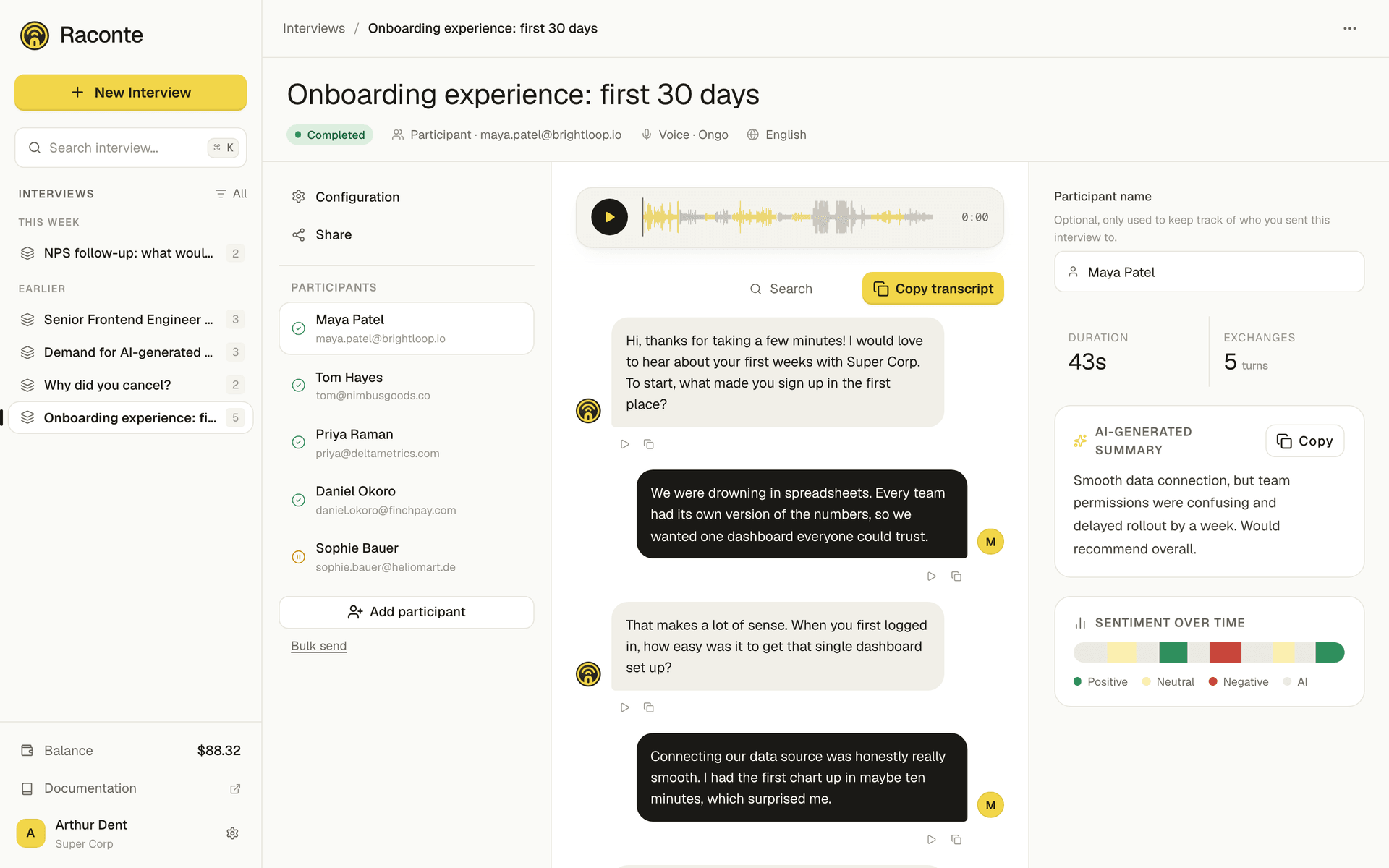
Micdrop ships integrations for OpenAI, Gemini, Mistral, Gladia, ElevenLabs, Cartesia, Gradium and local models. You can plug any other provider into the same interfaces. When a provider fails, a fallback takes over.
Just call Micdrop.start() and your app holds a conversation.
Micdrop is free and open source under the MIT license. Bring your own API keys, or run the models on your own machine.