Voice Activity Detection in the Browser: Silero vs WebRTC
A browser voice agent needs voice activity detection to tell when the user speaks. Compare volume thresholds, WebRTC VAD and Silero, then tune your choice.
August 13, 2026
Godefroy de CompreignacUpdated on September 25, 2026
Key takeaways
- Voice activity detection classifies audio frame by frame as speech or silence. It opens the recording, closes it, and gives the user a way to cut the assistant off.
- A volume threshold costs nothing and breaks in a noisy room. WebRTC VAD needs no model file. Silero, a 309K-parameter network, tells a voice from a television in under a millisecond per frame.
- Confirming speech in two stages, with the first chunks queued instead of sent, makes a false positive free.
- A VAD only hears that the sound stopped. A turn detector decides whether that pause ends the turn, judging from the sound of the sentence or from its transcript.
Voice activity detection (VAD) is the piece of code that decides, frame by frame, whether an audio signal carries human speech or silence. In a voice agent it runs in the browser and gates everything downstream: when to record, when to send audio to the server, when to stop the assistant mid-sentence. Three detectors cover almost every browser project: a volume threshold, WebRTC VAD and Silero VAD. Silero is the one to pick for a voice agent, because it tells a voice from a television or a fan far more reliably than the other two, and it still scores a frame in under a millisecond.
Get it wrong and the symptoms are immediate. The agent answers a door slam, or it keeps listening three seconds after you finished, or it talks over you because it never noticed you started. Users read all three as a broken product, and all three happen before a single byte reaches the transcription API.
What voice activity detection does in a voice agent
Without a VAD, the browser has two options, and both are bad. Stream the microphone continuously and you pay a transcription bill for every minute of silence while your server has no idea when a question ends. Ask the user to press and hold a button and you have a walkie-talkie rather than a conversation.
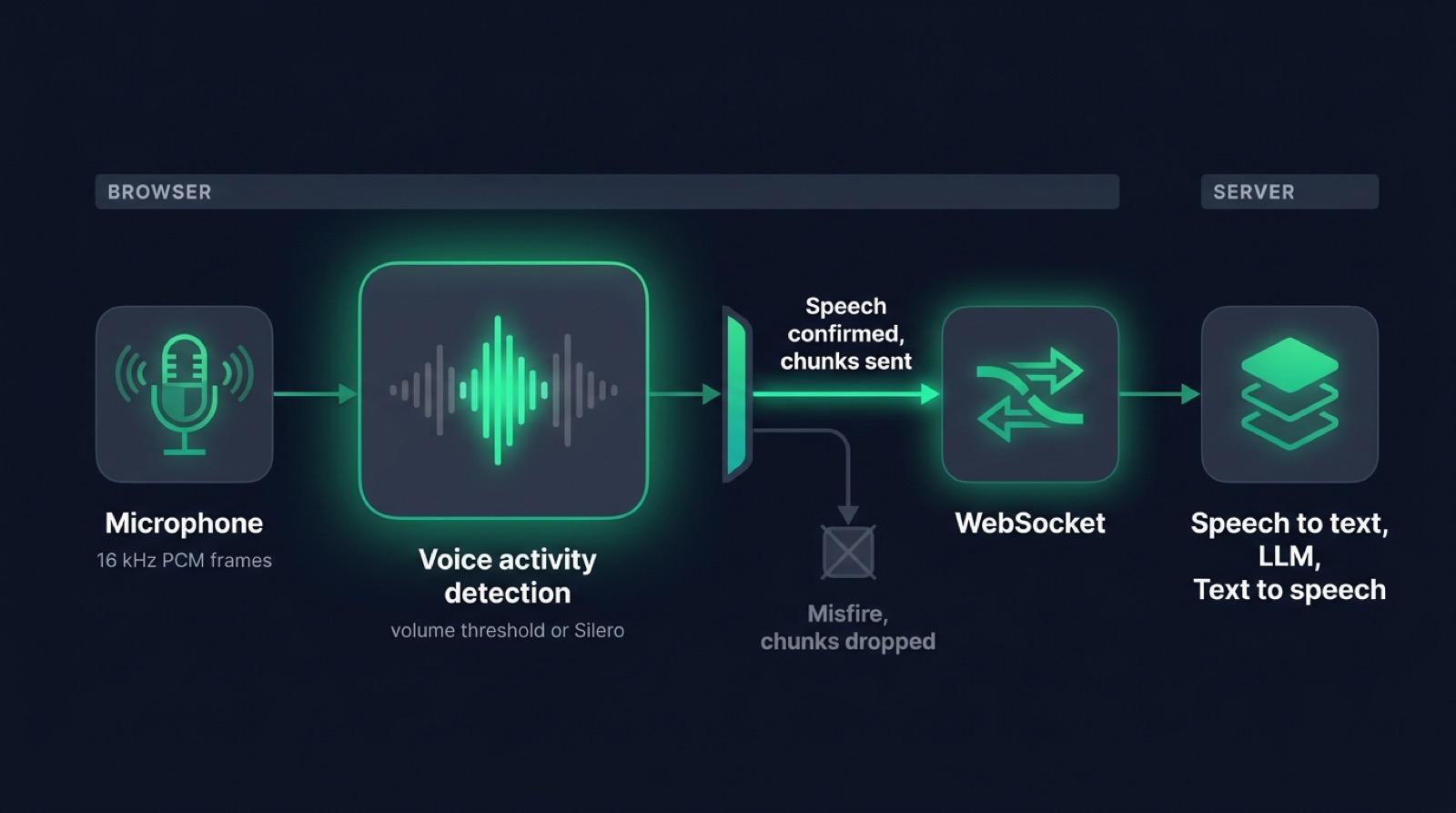
A VAD gives you the boundaries. It watches the microphone stream and emits two events: speech started, speech ended. Everything the pipeline does hangs off those two moments.
- Recording opens when speech starts, so audio leaves the machine only while someone is talking.
- The server knows an utterance is complete when speech ends, which is its cue to transcribe and answer.
- Playback of the assistant stops as soon as speech is confirmed, which is what makes interruption possible.
Micdrop, an open source TypeScript library for real-time voice conversations with AI, runs the VAD locally in its browser package. The package resamples the microphone to 16 kHz PCM and pushes chunks over a WebSocket only between those two events. The server never receives the silence.
The volume threshold, the simplest VAD
The cheapest VAD compares loudness against a threshold. Take the microphone stream, run it through an FFT the way a Web Audio AnalyserNode does, keep the loudest frequency bin and compare it with a value in decibels. Above the line is speech, below is silence.
Micdrop’s VolumeVAD does exactly that, with a 512-point FFT, a default threshold of -55 dBFS and a check every 100 ms. It skips the first four frequency bins, where fan noise and desk bumps live, and it requires two of the last three checks to sit above the threshold before it confirms. Skipping those bins and requiring a repeat matter more than the algorithm itself, because a single spike stays a spike.
This works well in a quiet room, costs nothing, and needs no download. It also has no idea what speech sounds like. A dog barking, a keyboard, a chair scraping, all of it clears the threshold.
WebRTC VAD, the detector from the WebRTC stack
WebRTC VAD is the voice activity detector Google wrote in C for the WebRTC project, the real-time audio and video stack built into Chrome. It is a Gaussian mixture model. It splits each frame into six frequency bands between 80 Hz and 4 kHz and scores them against statistical models of speech and of noise, which it keeps adapting during the call. It takes 16-bit mono PCM at 8, 16, 32 or 48 kHz, in frames of exactly 10, 20 or 30 ms, and exposes four aggressiveness modes from 0 to 3. A higher mode rejects more noise and skips more real speech along the way.
It is still everywhere, for good reasons. It needs no model file, uses almost no CPU, and always gives the same output for the same input. Most developers meet it through py-webrtcvad, the Python binding installed as webrtcvad, which plenty of speech preprocessing scripts still call to strip silences before transcription. libfvad extracts the same code as a standalone C library, and projects compile that version to WebAssembly to use it from JavaScript.
Chrome runs WebRTC VAD inside its own audio engine, but no Web API exposes its decisions, so to use it from a web page, you ship a WebAssembly build and feed it frames yourself.
Micdrop runs Silero instead of a WebAssembly build of WebRTC VAD, because WebRTC VAD makes its mistakes in the noisy rooms where people talk to voice agents. WebRTC VAD reacts to energy in the speech bands. It handles steady noise well once it has adapted to it, but it lets through anything loud with a voice-like spectrum: a television, a colleague across the room, music with vocals, café chatter. The Silero team publishes quality metrics that put its model well ahead of WebRTC VAD on noisy recordings. For a script that trims silences from clean recordings, WebRTC VAD remains a sound choice and costs less.
Silero VAD, a neural network that runs in the browser
Silero VAD is a small neural network that the Silero team publishes under the MIT license. It has around 309K parameters, reads a 512-sample frame (32 ms at 16 kHz) and returns a speech probability between 0 and 1. An LSTM state carries across frames, so the model hears context rather than isolated slices. The model scores one frame in under a millisecond on a single CPU thread, the ONNX file weighs about 2 MB, and the training data covers thousands of languages.
Silero separates a human voice from a television, a fan or a passing truck, which no volume threshold can do. Voice agents made it their default detector because it gets that right while staying small and fast enough to run on the user’s device.
Running Silero VAD in the browser
In the browser, the model runs on ONNX Runtime Web with its WebAssembly backend. Microphone audio is resampled to 16 kHz, sliced into 512-sample frames and scored one frame at a time. The model and the runtime download on the first call and stay in the browser cache afterwards.
Silero reached JavaScript through ricky0123/vad, the open source project that packages the model for the browser as @ricky0123/vad-web. Micdrop follows its algorithm, which rests on two probability thresholds and two frame counts. By default, Micdrop also fetches the Silero model file from that package.
Micdrop turns Silero on with one import and one option:
import { Micdrop } from '@micdrop/web'import '@micdrop/web/silero'
await Micdrop.start({  url: 'wss://your-app.com/call',  vad: 'silero',})
The second import adds ONNX Runtime Web to the bundle. An app that sticks to the volume threshold never downloads it.
SileroVAD takes the two thresholds and the two frame counts as constructor options:
import { Micdrop, SileroVAD } from '@micdrop/web'import '@micdrop/web/silero'
const vad = new SileroVAD({  positiveSpeechThreshold: 0.18, // probability above which a frame counts as speech  negativeSpeechThreshold: 0.11, // probability below which a frame counts as silence  minSpeechFrames: 8, // frames of speech before confirming  redemptionFrames: 20, // frames of silence before closing the utterance})
await Micdrop.start({ url: 'wss://your-app.com/call', vad })
Frames are the unit, so translate them into time before tuning anything. At 32 ms per frame, 8 frames of speech is 256 ms before a confirmation, and 20 redemption frames is 640 ms of silence before the utterance closes. Those 640 ms are the single largest chunk of perceived latency you control from the browser.
The thresholds are deliberately low here. ricky0123/vad ships higher defaults. Micdrop uses 0.18 because soft-spoken users get cut out at the higher values. A lower threshold fires more often on noise. Those misfires cost nothing, because Micdrop confirms speech in two stages before any audio leaves the browser.
ONNX Runtime Web needs its .wasm files reachable at runtime. By default Micdrop fetches the Silero model from jsDelivr and the ONNX runtime from unpkg, because the runtime’s dist folder exceeds the jsDelivr size limit and every file 404s from there. To keep the call free of third-party requests, host both yourself and pass their addresses to setSileroOptions({ model, wasmPath }).
Silero VAD vs WebRTC VAD vs a volume threshold
| Approach | What it measures | Download | Per-frame cost | Noisy room |
|---|---|---|---|---|
| Volume threshold | Loudness in dBFS | None | Negligible | Poor |
| WebRTC VAD | Six frequency bands, GMM | WASM build of libfvad | Very low | Fair |
| Silero VAD | Speech probability from a neural net | About 2 MB, plus the ONNX runtime | Under 1 ms | Good |
Pick the detector from the room your users sit in and from where the audio gets processed:
- In a quiet room with a headset, the volume threshold is enough and adds nothing to the page.
- On a server that strips silences from thousands of recordings, WebRTC VAD is the cheapest of the three that knows what speech sounds like.
- For a live conversation in an open space, a car or a kitchen, Silero is worth its two megabytes.
The code of all three is on GitHub. snakers4/silero-vad holds the Silero model and its benchmarks, ricky0123/vad runs it in JavaScript, wiseman/py-webrtcvad and dpirch/libfvad carry WebRTC VAD, and Godefroy/micdrop holds the browser and server code shown in this article.
Tuning latency, false positives and background noise
Every VAD setting trades one failure for another. Raise the threshold and you stop reacting to the air conditioning, and you also stop hearing a quiet user. Shorten the silence window and the agent feels snappy right up to the moment it interrupts someone drawing breath.
Micdrop softens that trade in the wiring of the events rather than in the model.
Speech is confirmed in two stages. Micdrop’s VADs emit StartSpeaking for a maybe, then either ConfirmSpeaking or CancelSpeaking. Recording begins on the maybe, and the resulting chunks are queued in memory instead of being sent. If the confirmation arrives, the queue flushes to the server with the first syllable intact. If the cancellation arrives, the queue is dropped and nothing ever left the machine. A false positive costs a few kilobytes of RAM.
Detection always lags the sound that triggered it, so Micdrop keeps a reserve of recent audio. The volume VAD waits for two loud readings among its last three checks, taken 100 ms apart. The first consonant of a word is often too soft to count as one of them. Silero scores a frame as speech a few frames after the voice began. Micdrop holds the last 500 ms of microphone audio with the volume detector, about 320 ms with Silero, and starts the recording from that reserve. Words keep their first consonant.
Micdrop can run both detectors at once, which helps in a room where one alone keeps firing on noise:
await Micdrop.start({ url: 'wss://your-app.com/call', vad: ['volume', 'silero'],})The combination emits a maybe as soon as either detector fires, and confirms only when both agree. The volume threshold filters out distant voices too quiet to be aimed at the microphone, and Silero filters out everything loud that is not human.
VAD and interruptions
Barge-in is the feature that separates a conversation from a menu system. Only the VAD can deliver it, because the transcription pipeline has nothing to work with while the assistant is talking. Something has to be listening to raw microphone audio and willing to act on it within a few hundred milliseconds.
In Micdrop the browser handles it without a server round trip. The moment speech is confirmed, playback stops locally, the processing state is cleared, and a message goes out telling the server to abandon the answer it was streaming.
The failure mode here is echo. If the assistant’s voice reaches the microphone through the speakers, the VAD hears speech and interrupts the agent with its own words, on loop. Micdrop asks getUserMedia for echoCancellation and noiseSuppression, which handles most laptop and phone setups. Loud external speakers can still defeat it, so headphones remain the reliable answer for a demo that has to work.
Where VAD stops and turn detection starts
A VAD reports acoustics. It tells you sound stopped, and it has no opinion about whether the sentence was finished:
“I’d like to book a flight to…”
The speaker paused to remember the city. Acoustically, this is a completed utterance with 700 ms of silence behind it, and any VAD tuned for responsiveness will close it. The agent then answers a half-question, and the user has to start over. A turn detection model that listens to whether the sentence sounds finished can keep the turn open through that pause.
Turn detection runs on top of the VAD and checks each pause the VAD reports. In Micdrop, the open Smart Turn model listens to the sound of the sentence right in the browser, and the server can also read the transcript to judge whether the thought is complete. The VAD keeps deciding when the microphone is worth recording, and the turn detector decides when the user is done talking.
Frequently asked questions
What is VAD?
VAD stands for voice activity detection. It is the process of classifying short frames of audio as speech or non-speech, usually every 10 to 32 milliseconds. Voice agents use it to know when to start recording, when an utterance has ended, and when the user is interrupting the assistant.
Does voice activity detection run offline in the browser?
Yes. A volume-based VAD uses the Web Audio API and needs no network at all. A Silero VAD downloads a model of about 2 MB plus the ONNX Runtime Web wasm files on first load, then runs entirely on the CPU of the device. No audio is sent anywhere for detection, which also means the microphone stream stays local until speech is actually detected.
What is Silero VAD and what are its applications?
Silero VAD is a neural network of about 309K parameters that reads a 512-sample frame, 32 milliseconds at 16 kHz, and returns the probability that the frame contains speech. Its LSTM state carries across frames, so it scores each frame using the ones before it. A volume threshold measures loudness and nothing else. Silero separates a human voice from a television, a fan or a passing truck. Voice agents use it to decide when to record and when the user interrupts. Transcription pipelines use it to cut silences before sending audio. Micdrop runs it as a client-side VAD, in the browser and on phones.
Is Silero VAD open source?
Yes. Silero VAD ships under the MIT license, with its code and weights on GitHub at snakers4/silero-vad. Micdrop runs the ONNX model in the browser with ONNX Runtime Web, following the algorithm of the ricky0123/vad project.
What is the difference between Silero VAD and WebRTC VAD?
WebRTC VAD is a Gaussian mixture model from the WebRTC project. It scores six frequency bands and needs no model file. Silero VAD is a neural network of about 2 MB that returns a speech probability for every 32 ms frame. WebRTC VAD costs less and handles steady noise, while Silero keeps telling a voice apart from a television or background chatter, which is why voice agents usually run Silero.
How big is the Silero VAD model?
The ONNX file of Silero VAD version 5 weighs about 2 MB, for around 309K parameters. In a browser, the ONNX Runtime Web files come on top and weigh more than the model. Both download once and then load from the browser cache. Micdrop only adds the runtime to your bundle when you import @micdrop/web/silero.
Should voice activity detection run in the browser or on the server?
For a voice agent, run it in the browser. The browser holds the microphone, so it keeps the audio on the device until someone speaks and stops the assistant the moment the user talks. A server-side VAD fits recordings processed after the fact. In a live call, it adds a network round trip to every interruption. Micdrop runs its VAD on the device, in the browser and in a React Native app.
What is the difference between VAD and turn detection?
A VAD works on the audio signal and answers “is someone speaking right now”. Turn detection answers “has this person finished their thought”, by listening to the sound of the sentence or by reading its transcript. A VAD closes an utterance after a fixed amount of silence, so it cuts off a user who pauses mid-sentence. Voice agents run both, with the VAD spotting each pause and the turn detector deciding whether it ends the turn.
Getting started
Voice activity detection is the least glamorous part of a voice agent and the one users feel first. Too high a threshold loses quiet speakers, too long a silence window makes every answer feel sluggish, and an agent that cannot be cut off feels deaf.
Micdrop ships the volume and Silero detectors, the two-stage confirmation and the interruption path in the browser package:
npm install @micdrop/web @micdrop/serverYou can tune every VAD option and combine the detectors, with a React settings panel to adjust the options live. You can also get a first call running in about five minutes.
When a page only has to write down what the user says, the recognisers built into Chrome and Safari do that without a server of your own. Read speech to text in JavaScript to see what you give up in exchange.
On a phone, @micdrop/react-native runs the volume detector by default, with Silero available as an extra native module. You also choose there where transcription happens, on the device or on your server. Read speech to text in React Native to compare the two.

