A Voice Agent That Runs Entirely on Your Machine
Ollama, Whisper and Piper make a voice agent that answers in about a second on a laptop, with no API key. We cover the setup, the latency and the traps we hit.
October 7, 2026
Godefroy de CompreignacKey takeaways
- A voice agent built on Ollama, Whisper and Piper needs no API key and answers about one second after the user stops talking, on a MacBook Pro M2 with 24 GB of memory.
- Pick a Qwen3 tag ending in -instruct. The default qwen3:4b tag reasons for 90 to 120 seconds per turn. On that tag, Ollama's think flag only moves that reasoning into the answer, where the voice reads it aloud.
- Small local models without reasoning kept the line open when the user said goodbye in our tests, so give the browser a hang-up button and an idle timeout.
- On a Mac, Whisper and Piper run fastest on the CPU, since CoreML made the Whisper encoder three to five times slower. Ollama already runs the LLM on the GPU.
A voice agent can run entirely on a laptop, with Whisper transcribing, a small LLM served by Ollama writing the answer and Piper speaking it, and no audio or text ever leaving the machine. On a MacBook Pro M2, that stack answers about one second after the user stops talking and holds around 4 GB of memory. This post sets it up from a Node server, gives the latency of each step, and covers the traps we hit while building it.
Most guides for an offline voice assistant assemble the same three parts in Python, with a loop around the microphone. Here the loop runs in a web page and a Node server, with Micdrop, an open source TypeScript library for real-time voice conversations with AI, handling the microphone, the WebSocket and the interruptions. Every figure comes from our measurements of local models, all taken on that one machine.
What the three parts become when they run locally
A voice call chains three models. Speech to text turns the user’s sentence into text, the LLM writes the answer, and text to speech reads it back. Each one has a local counterpart that a Node server can drive:
| Part | Local choice | Where it runs | Download |
|---|---|---|---|
| Speech to text | Whisper base | Inside the Node process, on the CPU | ~85 MB |
| LLM | Qwen3 4B Instruct, served by Ollama | The Ollama daemon, on the GPU | 2.5 GB in Q4 |
| Text to speech | Piper | A subprocess, on the CPU | A few dozen MB per voice |
We picked Piper over the other local voices because it speaks around forty languages and runs well on any CPU. In English, Kokoro installs with a single npm command and Pocket TTS starts speaking a little sooner. We measured all three side by side for local text to speech in Node. Whisper has faster rivals for local speech to text in Node, but it is the one you install with npm and nothing else.
Micdrop drives the LLM through its AI SDK integration. Ollama serves the OpenAI protocol on /v1, like LM Studio and llama-server, so either one can replace it on another port.
graph TD
    A[Browser microphone] -->|PCM audio over WebSocket| B[Node server]
    B --> C[Whisper base, CPU, inside Node]
    C -->|transcript| D[Ollama daemon, Qwen3 4B Instruct, GPU]
    D -->|answer, token by token| E[Piper subprocess, CPU]
    E -->|PCM audio over WebSocket| F[Browser speaker]
Setting up Ollama, Whisper and Piper
Start with the LLM. The Ollama daemon has to be running before ollama pull can reach it:
brew install ollamabrew services start ollamaollama pull qwen3:4b-instructThen install the Piper binary and download one voice, which comes as two files kept side by side:
pip install piper-ttsmkdir -p voices && cd voicesBASE=https://huggingface.co/rhasspy/piper-voices/resolve/main/en/en_GB/alba/mediumcurl -LO $BASE/en_GB-alba-medium.onnxcurl -LO $BASE/en_GB-alba-medium.onnx.jsonThen install the Node packages. Whisper downloads its weights on first use:
npm install @micdrop/server @micdrop/ai-sdk @micdrop/whisper @micdrop/piper @ai-sdk/openai wsThe server creates one MicdropServer per WebSocket connection:
import { createOpenAI } from '@ai-sdk/openai'import { AiSdkAgent } from '@micdrop/ai-sdk'import { PiperTTS } from '@micdrop/piper'import { MicdropServer } from '@micdrop/server'import { WhisperSTT } from '@micdrop/whisper'import { WebSocketServer } from 'ws'
// Ollama serves the OpenAI protocol on /v1const ollama = createOpenAI({  baseURL: 'http://localhost:11434/v1',  apiKey: 'ollama', // Unused, the SDK refuses to start without one})
const wss = new WebSocketServer({ port: 8081 })
wss.on('connection', (socket) => {  new MicdropServer(socket, {    firstMessage: 'Hello, how can I help?',
    agent: new AiSdkAgent({      // .chat() targets the chat completions route, which Ollama serves      model: ollama.chat('qwen3:4b-instruct'),      systemPrompt:        'You are a voice assistant. Answer in English, in one or two short sentences. Write numbers in words.',      providerOptions: { openai: { reasoningEffort: 'none' } },    }),
    stt: new WhisperSTT({ model: 'base', language: 'en' }),
    tts: new PiperTTS({ modelPath: './voices/en_GB-alba-medium.onnx' }),  })})
The browser side is the same as with hosted providers:
import { Micdrop } from '@micdrop/web'
Micdrop.start({ url: 'ws://localhost:8081' })
Run one call before showing the agent to anyone. The first call downloads the Whisper weights and loads every model. After that, Micdrop keeps each model loaded between turns and shares it between calls.
Ollama has its own timer. It unloads a model after five minutes without a request, so the next call waits several seconds while the model reloads. On a machine dedicated to the agent, start the daemon with OLLAMA_KEEP_ALIVE=-1 to keep the model in memory.
The latency you get
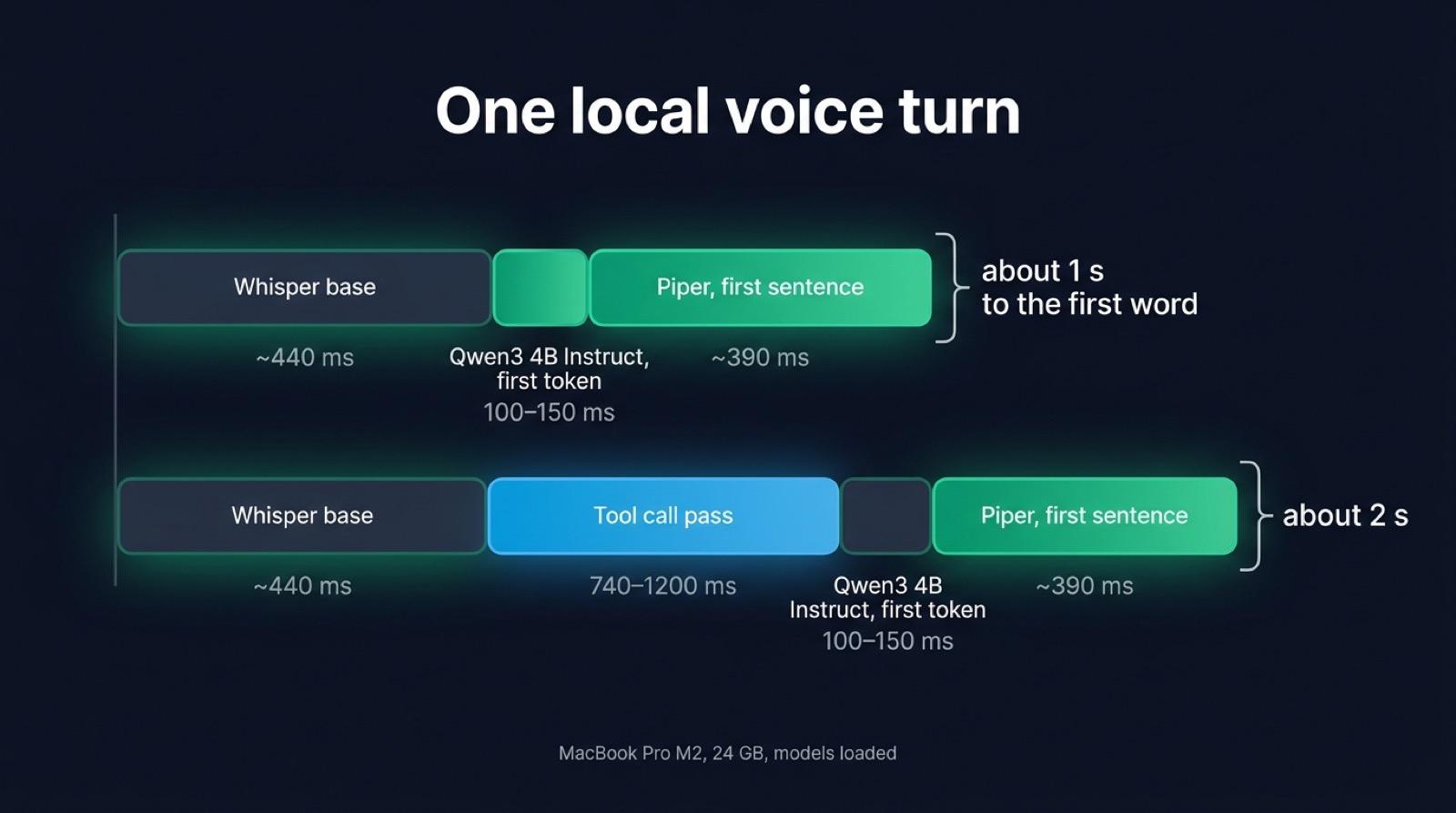
The user hears the first word once Whisper has transcribed the sentence, the LLM has written its first tokens and Piper has synthesized the first sentence of the answer:
| Step | Time on a MacBook Pro M2 |
|---|---|
Whisper base on a 3 second sentence | ~440 ms |
| First token from Qwen3 4B Instruct | 100 to 150 ms |
| First sentence from Piper | ~390 ms |
| Total, end of speech to first audio | about 1 s |
We measured each step with the model already loaded. We also measured one call end to end in the demo app, with the assistant speaking first so that nothing needed transcribing. The first audio reached the browser 1.66 seconds after the call opened.
A French call takes longer. The generic base checkpoint gets a quarter of the words of a French sentence wrong, so switch to the french checkpoint, which gets 2% of the words wrong and takes about 1.1 s on the same 3 second sentence. The first word then arrives after about 1.6 s.
Tool calls cost more than any of these steps. Every tool you declare, and each of Micdrop’s automatic prompts (ending the call, semantic turn detection, ignoring noise), asks the model to decide on a tool call before it answers. That extra pass takes 740 to 1200 ms, about as long as transcription and the voice put together. Turn on only the ones you need.
Memory is less of a problem than latency. Qwen3 4B in Q4, Whisper base and a voice take around 4 GB, which leaves room on a 16 GB machine. Spend spare memory on a larger LLM rather than on a larger Whisper checkpoint, since a larger checkpoint makes every sentence slower.
What a small model gets wrong
The reasoning variant takes up to two minutes per turn
qwen3:4b, the default tag, is the reasoning variant. It writes 900 to 1500 tokens of reasoning before answering, which takes 90 to 120 seconds per turn on this machine. Adding /no_think to the prompt leaves the reasoning in place, and so does Ollama’s think flag. With that flag, Ollama only stops separating the reasoning from the answer, so Piper reads the reasoning aloud.
Pull the tag ending in -instruct, which answers directly. Keep reasoningEffort: 'none' in the agent options anyway. Ollama maps it to its think flag, which does switch reasoning off on models that use the same weights with and without reasoning, such as MiniCPM5-2B. A model without reasoning, like Qwen3 4B Instruct, ignores it.
The call never ends on goodbye
Micdrop’s autoEndCall option asks the model to call an end-of-call tool when the user wants to hang up. None of the small models without reasoning triggered it in our tests. When the user said “Merci, au revoir !”, Qwen3 4B and MiniCPM5-2B both said goodbye and left the line open. Mistral 7B thanked the user for “the instructions”. Only the reasoning variant of Qwen3 4B ended the call, at the cost of up to two minutes per turn.
So leave autoEndCall off and end the call from the browser. A hang-up button covers the user who wants to leave, and an idle timer covers the one who stops talking:
import { Micdrop } from '@micdrop/web'
let idle: ReturnType<typeof setTimeout> | undefined
// Hangs up after 30 seconds with nobody speakingMicdrop.on('StateChange', (state) => {  clearTimeout(idle)  if (state.isStarted && !state.isUserSpeaking && !state.isAssistantSpeaking) {    idle = setTimeout(() => Micdrop.stop(), 30_000)  }})
hangUpButton.addEventListener('click', () => Micdrop.stop())
Other tool calls hold up better. When we asked the time with a get_time tool available, Qwen3 4B called it and answered in 1.1 to 1.3 s, while Mistral 7B made up a time without calling anything. With autoIgnoreUserNoise on, Qwen3 4B skipped a meaningless “uh” three times out of four. You can compare how the three local LLMs handle tool calls, MiniCPM5-2B included.
Numbers come out in digits
Qwen3 4B sometimes writes “3” even though the system prompt asks for numbers in words. The voice then reads those digits inconsistently. Keep that instruction in the prompt anyway, then listen to the sentences your product says most often.
The GPU made transcription three times slower
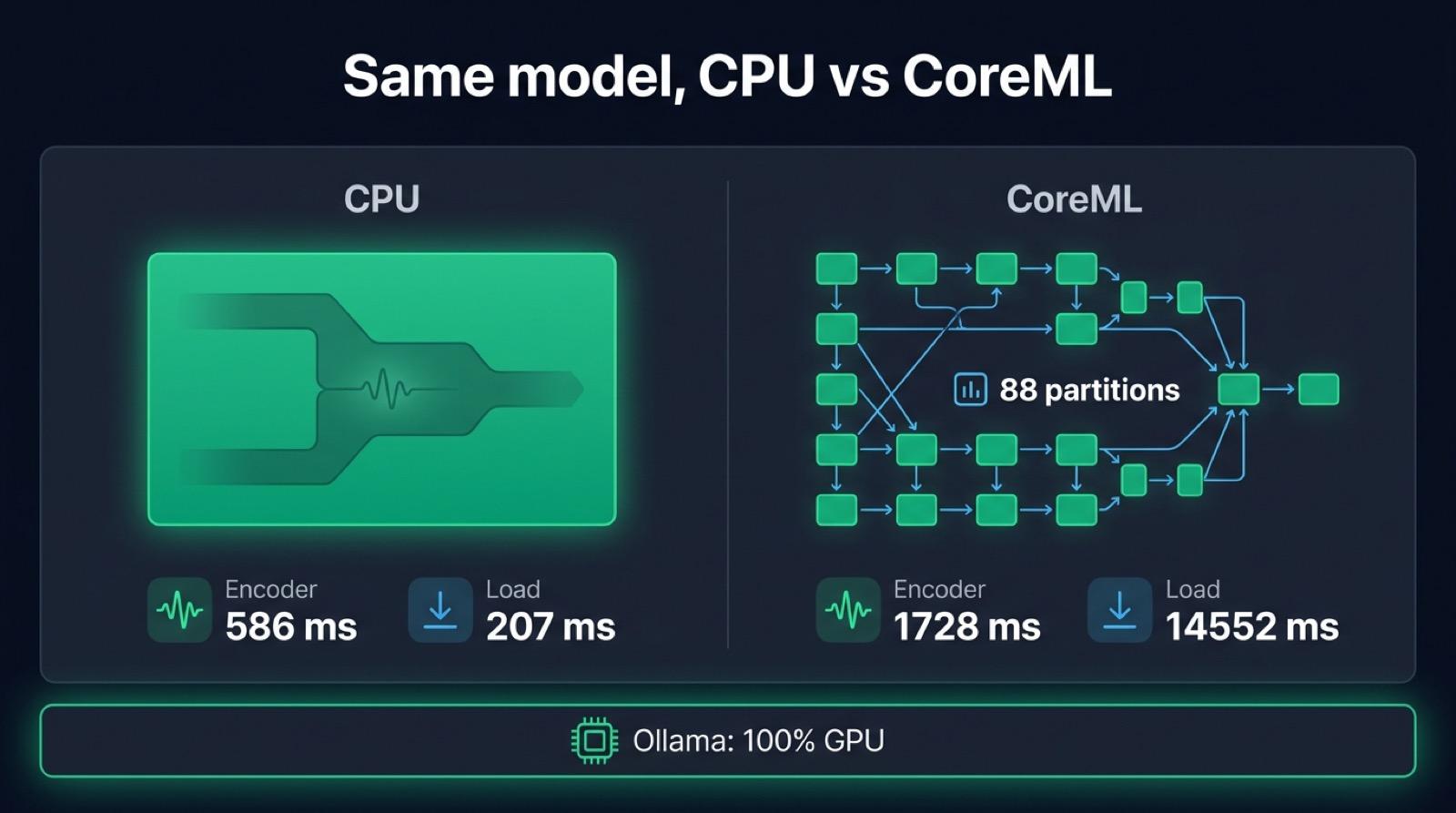
On a Mac, the obvious move is to put Whisper on the GPU, so we tried it. Transformers.js declares no GPU device on macOS, and WebGPU does not exist in Node, but the ONNX Runtime package for Node includes the CoreML provider. We ran the encoder of the french Whisper checkpoint on the CPU and on CoreML:
| Provider | Encoder | Session load |
|---|---|---|
| CPU | 586 ms | 207 ms |
| CoreML | 1728 ms | 14552 ms |
CoreML ran the encoder three times slower, and took 14 seconds to compile the model when the session opened. Its log shows why: CoreML handles 577 of the 873 nodes and splits the graph into 88 partitions, so most of the time goes into copying tensors between partitions. With the MLProgram format it got slower still, at 2975 ms.
Keep Whisper on the CPU, with the quantized q8 weights it uses by default. Piper has a --cuda flag and no Metal equivalent. It runs fast enough on the CPU anyway. On Linux with an NVIDIA card, device: 'cuda' is worth measuring on your own server.
Ollama already uses the GPU
The Mac’s GPU stays busy during the call anyway. Ollama runs the LLM, by far the heaviest model in the call, on Metal on a Mac and on CUDA on a machine with an NVIDIA card. ollama ps shows 100% GPU while a call is in progress. So the split on a Mac is the right one: the LLM on the GPU, transcription and the voice on the CPU, each on the hardware where it runs fastest.
When local is the right answer
A local stack makes sense for a product whose health or legal conversations must stay on the machine, for a demo on a network you do not control, or for a development setup where nobody wants to share API keys. It costs nothing per minute, since Micdrop is MIT-licensed and the recommended models carry permissive licenses. Piper’s engine is GPL-3.0. Micdrop runs it as a separate process, so the GPL terms come into play when you redistribute the Piper binary yourself.
A local stack makes less sense when the agent has to follow a long script, call several tools reliably or hang up on its own. A 4B model handles a short exchange well and falls behind a hosted model as soon as the conversation needs judgment. The voice is the other limit. Piper sounds less natural than a hosted voice from ElevenLabs or Cartesia. The local voices that sound better either speak only English, like Kokoro and Pocket TTS, or need a GPU and a server next to your app, like Qwen3-TTS.
You can mix the two. Each part is one line in the server, so a product can keep transcription local and send the text to a hosted LLM, or run everything locally in development and switch to a European hosted stack in production. The browser code stays the same either way.
Micdrop handles what you would otherwise write around the three models: microphone capture and voice activity detection in the browser, audio streaming over the WebSocket, cutting the voice when the user interrupts, restarting the Piper process so it is ready for the next answer, and the warm-up that moves the first inference to call setup. A hosted platform such as Vapi charged $0.05 a minute in September 2026 for that orchestration, before any model bill. You still build what a platform adds on top, such as hosting, call history and a dashboard.
The fastest way to hear the stack is to run a first voice call in five minutes, then swap the providers for the local ones above.


